

Bucket Policy Parameters
A bucket policy in JSON format:
{
"Statement" : [{
     statement1
  },
  {
     statement2
  },
  ......
 ]
}
{
"Statement" : [{
     "Sid": "ExampleStatementID1",
     "Principal": "*",
     "Effect": "Allow",
     "Action": ["ListBucket"],
     "Resource": "examplebucket",
     "Condition": "some conditions"
  },
  {
     "Sid": "ExampleStatementID2",
     "Principal": "*",
     "Effect": "Allow",
     "Action": ["PutObject"],
     "Resource": "examplebucket",
     "Condition": "some conditions"
  },
......
]
}
A policy consists of one or more statements. Each statement contains the following elements:
|
Element |
Description |
Mandatory/Optional |
||
|---|---|---|---|---|
|
Sid |
ID of the statement. The value is a string that describes the statement. |
Optional |
||
|
Principal |
The entities that are granted access. The statement applies only to the domains (accounts) and IAM users defined in the Principal element. You can set Principal to a wildcard (*) to indicate all users. To grant access to all users in a domain, set Principal to domain/domainid:user/*. To grant access to a specific user in a domain, set Principal to domain/domainid:user/userId or domain/domainid:user/userName. |
Optional. Configure either Principal or NotPrincipal. |
||
|
NotPrincipal |
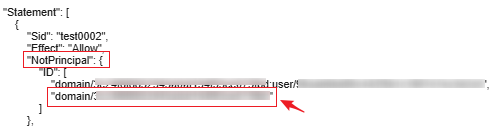
The entities that are not granted access. The statement does not apply to the domains (accounts) or IAM users defined in the NotPrincipal element. Its value has the same format as Principal. When using NotPrincipal to exclude an IAM user, you must add the IAM user's domain_id to the ID field. The format is as follows: domain/domain_id.
The following gives an example that denies all operations performed by users except the specified IAM user. domain_id indicates the account ID. user_id indicates the IAM user ID.
|
Optional. Configure either NotPrincipal or Principal. |
||
|
Action |
Actions that the statement applies to. This parameter specifies a set of all the operations supported by OBS. Its values are case insensitive. The value can be a wildcard character (*) that indicates all operations. For example: "Action":["List*","Get*"]. |
Optional. Configure either Action or NotAction. |
||
|
NotAction |
Actions that are not controlled by this statement. Its value has the same format as Action. |
Optional. Configure either Action or NotAction. |
||
|
Effect |
Whether the permission in a statement is Allow or Deny. |
Mandatory |
||
|
Resource |
Resources that the statement will apply to. You can use a wildcard (*) to indicate all resources. |
Optional. Configure either Resource or NotResource. |
||
|
NotResource |
Resources that the statement will not apply to. Its value has the same format as Resource. |
Optional. Configure either Resource or NotResource. |
||
|
Condition |
Conditions for the statement to take effect. |
Optional |

A statement must contain Action or NotAction, Resource or NotResource, and Principal or NotPrincipal.
Principal/NotPrincipal
Principal or NotPrincipal can be anonymous users, specific tenants, specific users, federated users, or agencies.
- All (anonymous users)
"Principal": {"ID": "*"}In the example, the wildcard (*) indicates Everyone/Anonymous. Do not use the wildcard for Principal of the role's trust policy unless you have restricted access by using the Condition element in the policy.
- Specific tenants
If a tenant identifier is used as the Principal of a policy, permissions are granted to all users of this tenant. This includes all subscribers under the account. The following example demonstrates how to specify an account as an authorized person.
"Principal": { "ID": " domain/domainIdxxxx:user/*" }You can also grant permissions to multiple tenants at a time:
"Principal": {
  "ID": [
    "domain/domainIDxx1:user/useridxxxx",
    "domain/domainIDxx2:user/*"
  ]
}
- Specific users
User names in the Principal element are case-sensitive.
"Principal": {"ID": "domain/domainIDxxx:user/user-name" }
"Principal": {
  "ID": [
    "domain/domainIDxxx:user/UserID1",
    "domain/domainIDxxx:user/UserID2"
  ]
}
- Federated users (using SAML identity provider)
To grant permissions to a federated user (that uses a SAML identity provider), you need to configure the principal in the following format. domainIDxxx indicates the account ID of the federated user. provider-name indicates the name of the user's identity provider.
"Principal": { "Federated": "domain/domainIDxxx:identity-provider/provider-name" }To grant permissions to a user group that a federated user (that uses a SAML identity provider) belongs to, you need to configure the principal in the following format. groupname indicates the name of the IAM user group that the federated user belongs to."Principal": { "Federated": "domain/domainIDxxx:group/groupname" } - Agencies
The principals on OBS Console refer to the users to whom the bucket policies apply. These users can be accounts or IAM users. You can specify the principals to include or exclude.
- Include: The policy applies to specified users.
- Exclude: The policy applies to users except the specified ones.
Specifying anonymous users

Exercise caution when granting permissions to anonymous users. If you grant the permissions to anonymous users, anyone can access your bucket. You are advised to restrict access requests. For example, you can allow access only from a specific IP address.
Action/NotAction
If a policy applies to a bucket, configure bucket-related actions. If the policy applies to the objects in a bucket, configure object-related actions.
Actions can be specified in either of the following ways:
- Include: The bucket policy applies to specified actions.
- Exclude: The bucket policy applies to actions except the specified ones.
Bucket Actions
For details, see .
Object Actions
For details, see .
Resource/NotResource
The resources supported by OBS are as follows:
- bucketname: The Action drop-down list box lists all actions allowed on a bucket. To allow an action on a bucket, set Resource to the bucket name.
- bucketname/objectname: The Action drop-down list box lists all actions allowed on an object. To allow an action on an object in a bucket, set Resource to bucketname/objectname. You can use a wildcard for objectname to allow an action on all objects in the bucket. For example, if you want to allow an action on all objects in a directory of a bucket, set Resource to "bucketname/directory/*". If you have permissions on all the objects in a bucket, set Resource to "bucketname/*". If you want to allow an action on both a bucket and its objects, set Resource to ["examplebucket/*","examplebucket"].
The following example policy grants the permissions to allow user1 with the ID of 71f3901173514e6988115ea2c26d1999 under account b4bf1b36d9ca43d984fbcb9491b6fce9 (account ID) to take all actions on the examplebucket bucket and all objects in it.
{
    "Statement":[
    {
      "Sid":"test",
      "Effect":"Allow",
      "Principal": {"ID": ["domain/b4bf1b36d9ca43d984fbcb9491b6fce9:user/71f3901173514e6988115ea2c26d1999"]},
      "Action":["*"],
      "Resource":["examplebucket/*","examplebucket"]
    }
  ]
}
On OBS Console, you can apply a bucket policy to the following resources: the current bucket, and all objects in a bucket.
You can specify the resources to include or exclude:
- Include: The bucket policy applies to specified OBS resources.
- Exclude: The bucket policy applies to OBS resources except the specified ones.
Applying a bucket policy to a bucket
Applying a bucket policy to specified objects
To apply a bucket policy to specified objects in a bucket, object-related actions must be configured in the policy.
- For an object, enter the object name (including its folder name if any). For example, if the resource is the example.jpg file in the imgs-folder folder in the bucket, enter the following in the resource text box:
imgs-folder/example.jpg
- For an object set, use the wildcard asterisk (*). The asterisk (*) indicates an empty string or any combination of characters.
- Use only one asterisk (*) to indicate all objects in a bucket.
- Use Object name prefix* to indicate objects with this prefix in a bucket. Example:
imgs*
- Use *Object name suffix to indicate objects with this suffix in a bucket. Example:
*.jpg
Condition
In addition to the effect, principals, resources, and actions, you can also specify the conditions for a bucket policy to take effect. The bucket policy is applied only when its condition expressions match the values contained in the request. Conditions are optional. You can choose whether to configure them.
|
Condition Operator |
Key |
Value |
|---|---|---|
|
StringEquals |
x-obs-acl |
bucket-owner-full-control |
A condition consists of condition operator, key, and value. Condition operators and keys are correlated. If you select a string type, for example, StringEquals, for a condition operator, the key can only be a string type, for example, UserAgent. Likewise, if you select a key of the date type, for example, CurrentTime, the condition operator can only be a date type, for example, DateEquals.
A condition can contain multiple combinations of a condition key, a condition operator, and a condition value. The Condition combination in the following figure indicates that the request time ranges from 2015-07-01T12:00:00Z to 2018-04-16T15:00:00Z and the request IP address range is 192.168.176.0/24 or 192.168.143.0/24.
"Condition" : {
  "DateGreaterThan" : {
  "CurrentTime" : "2015-07-01T12:00:00Z"
  },
  "DateLessThan": {
  "CurrentTime" : "2018-04-16T15:00:00Z"
  },
  "IpAddress" : {
  "SourceIp" : ["192.168.176.0/24","192.168.143.0/24"]
  }
}
Condition Operators
A condition operator, a condition key, and a condition value together constitute a complete condition statement. A policy can be applied only when its request conditions are met. Table 2 lists the condition operators available for statements. If a condition operator corresponds to multiple identical keys, only the last key is retained.
|
Type |
Element |
Description |
|---|---|---|
|
String |
StringEquals |
Strict matching. Short version: streq |
|
StringNotEquals |
Strict negated matching. Short version: strneq |
|
|
StringEqualsIgnoreCase |
Strict matching, ignoring case. Short version: streqi |
|
|
StringNotEqualsIgnoreCase |
Strict negated matching, ignoring case. Short version: strneqi |
|
|
StringLike |
Case-sensitive pattern matching. The values can include a multi-character match wildcard (*) or a single-character match wildcard (?) anywhere in the string. Short version: strl |
|
|
StringNotLike |
Case-sensitive pattern non-matching. The values can include a multi-character match wildcard (*) or a single-character match wildcard (?) anywhere in the string. Short version: strnl |
|
|
Numeric |
NumericEquals |
Matching. Short version: numeq Numeric indicates a data type expressed in numbers. |
|
NumericNotEquals |
Negated matching. Short version: numneq |
|
|
NumericLessThan |
"Less than" matching. Short version: numlt |
|
|
NumericLessThanEquals |
"Less than or equals" matching. Short version: numlteq |
|
|
NumericGreaterThan |
"Greater than" matching. Short version: numgt |
|
|
NumericGreaterThanEquals |
"Greater than or equals" matching. Short version: numgteq |
|
|
Date (The date format must comply with the ISO 8601 standard, for example, 2015-07-01T12:00:00Z.) |
DateEquals |
Matching a specific date. Short version: dateeq |
|
DateNotEquals |
Negated matching. Short version: dateneq |
|
|
DateLessThan |
The date is earlier than a specific date. Short version: datelt |
|
|
DateLessThanEquals |
The date is earlier than or equal to a specific date. Short version: datelteq |
|
|
DateGreaterThan |
The date is later than a specific date. Short version: dategt |
|
|
DateGreaterThanEquals |
The date is later than or equal to a specific date. Short version: dategteq |
|
|
Boolean |
Bool |
Strict Boolean matching |
|
IP address |
IpAddress |
Specified IP address or range |
|
NotIpAddress |
All IP addresses excluding the specified IP address or range |
Condition Keys
Condition keys fall into three categories: general keys, keys related to bucket actions, and keys related to object actions. Table 3 lists the general keys that apply to all actions.
|
Key |
Type |
Description |
Supported by IAM Policies (Yes/No) |
Supported by Bucket Policies (Yes/No) |
|---|---|---|---|---|
|
CurrentTime |
Date |
Same as g:CurrentTime |
Yes |
Yes |
|
EpochTime |
Numeric |
Time when the server received the request, which was expressed as the number of seconds since 1970.01.01 00:00:00 UTC, ignoring leap seconds. The value is a Unix timestamp. |
Yes |
Yes |
|
Referer |
String |
Same as g:Referer |
Yes |
Yes |
|
SecureTransport |
Boolean |
Same as g:SecureTransport |
Yes |
Yes |
|
SourceIp |
IP address |
IP address that made the request. When SourceIp is used, the IP address provided by the customer is preferentially identified. If no IP address is provided, the previous-hop IP address is identified. Using SourceIp may cause IP address spoofing. |
Yes |
Yes |
|
UserAgent |
String |
Same as g:UserAgent |
Yes |
Yes |
Action-related condition keys can be used only when a specific action is selected. Table 4 and Table 5 list the mapping between actions and condition keys.
|
Action |
Optional Key |
Description |
Remarks |
Supported by IAM Policies (Yes/No) |
Supported by Bucket Policies (Yes/No) |
|---|---|---|---|---|---|
|
ListBucket |
prefix |
Type: String. Lists objects with the specified prefix. |
If prefix, delimiter, and max-keys are configured for a bucket policy, the List requests must contain the matched key-value pair. For example, if a bucket policy (with the condition operator set to NumericEquals, the key to max-keys, and the value to 100) is configured to allow anonymous users to read data from a bucket, the List requests from the anonymous users must have ?max-keys=100 at the end of the bucket domain name. The listed objects are the first 100 objects in alphabetic order. |
Yes |
Yes |
|
delimiter |
Type: String. Groups objects in a bucket. |
Yes |
Yes |
||
|
max-keys |
Type: Numeric. Sets the maximum number of objects. Returned objects are listed in alphabetic order. |
Yes |
Yes |
||
|
ListBucketVersions |
prefix |
Type: String. Lists multi-version objects with the specified prefix. |
Yes |
Yes |
|
|
delimiter |
Type: String. Groups objects of different versions in a bucket. |
Yes |
Yes |
||
|
max-keys |
Type: Numeric. Sets the maximum number of objects. Returned objects are listed in alphabetic order. |
Yes |
Yes |
||
|
PutBucketAcl |
x-obs-acl |
Type: String. Configures the bucket ACL. When modifying a bucket ACL, you can use the request that contains a canned ACL setting in its header. Value options of a canned ACL setting: private|public-read|public-read-write|bucketowner-read|log-delivery-write. |
None |
Yes |
Yes |
|
CreateBucket |
x-obs-server-side-encryption-kms-key-id |
A string that specifies the KMS key IDs that cannot be used for encryption. If the ID is set to obs/default, the default key is not allowed. If SSE-OBS or SSE-C is used, this field must be left blank. |
None |
Yes |
Yes |
|
PutEncryptionConfiguration |
|
Action |
Optional Key |
Description |
Supported by IAM Policies (Yes/No) |
Supported by Bucket Policies (Yes/No) |
|---|---|---|---|---|
|
PutObject |
x-obs-acl |
Type: String. Configures the object ACL. When uploading an object, you can use the request that contains a canned ACL setting in its header. Value options of a canned ACL setting: private|public-read|public-read-write|bucketowner-read|bucket-owner-full-control|log-delivery-write. |
Yes |
Yes |
|
x-obs-copy-source |
Type: String. Specifies names of the source bucket and the source object. Format: /bucketname/keyname |
Yes |
Yes |
|
|
x-obs-metadata-directive |
Type: String. Specifies whether to copy the metadata of the source object or replace with the metadata in the request. The value can be COPY or REPLACE. |
Yes |
Yes |
|
|
x-obs-server-side-encryption |
Type: String. Specifies that objects in a bucket are encrypted using SSE-KMS before they are stored. The value is kms. |
Yes |
Yes |
|
|
x-obs-server-side-encryption-kms-key-id |
A string that specifies the KMS key IDs that cannot be used for encryption. If the ID is set to obs/default, the default key is not allowed. If SSE-OBS or SSE-C is used, this field must be left blank. |
Yes |
Yes |
|
|
PutObjectAcl |
x-obs-acl |
Type: String. Configures the object ACL. When uploading an object, you can use the request that contains a canned ACL setting in its header. Value options of a canned ACL setting: private|public-read|public-read-write|bucketowner-read|bucket-owner-full-control|log-delivery-write. |
Yes |
Yes |
|
GetObjectVersion |
versionId |
Type: String. Obtains the object with the specified version ID. |
Yes |
Yes |
|
GetObjectVersionAcl |
versionId |
Type: String. Obtains the ACL of the object with the specified version ID. |
Yes |
Yes |
|
PutObjectVersionAcl |
versionId |
Type: String. Specifies a version ID. |
Yes |
Yes |
|
x-obs-acl |
Type: String. Configures the ACL of the object with the specified version ID. When uploading an object, you can use the request that contains a canned ACL setting in its header. Value options of a canned ACL setting: private|public-read|public-read-write|bucketowner-read|bucket-owner-full-control|log-delivery-write. |
Yes |
Yes |
|
|
DeleteObjectVersion |
versionId |
Type: String. Deletes the object with the specified version ID. |
Yes |
Yes |
Policy Permission Judgment Logic
Each statement in a policy can have the action Explicit Deny, Allow, or Default Deny. If a bucket policy contains multiple statements with different actions, the final action is determined according to the following rules:
- If there are no Explicit Deny or Allow, Default Deny will apply.
- An explicit deny overrides an allow.
- An allow overrides a default deny.
- Statements can be in any order in a policy.
|
Result |
Description |
|---|---|
|
explicit deny |
A statement defines effect="deny". All requests for resources to which the statement applies are denied. No permission is returned. |
|
allow |
A statement defines effect="allow". All requests for resources to which the statement applies are allowed. |
|
default deny |
Conditions defined in a statement are not met. Requests are denied. |
If both an ACL and a bucket policy apply, an explicit deny in the bucket policy overrides the allow in the ACL.
If both a bucket policy and an IAM policy apply, an explicit deny overrides an allow, and an allow overrides the default deny.
Bucket ACL/Policy for cross-tenant authorization does not apply to SSE-KMS server-side encrypted objects.
Feedback
Was this page helpful?
Provide feedbackThank you very much for your feedback. We will continue working to improve the documentation.See the reply and handling status in My Cloud VOC.
For any further questions, feel free to contact us through the chatbot.
Chatbot


