

Resource Package Renewals
When to Renew Subscriptions
If a resource package is about to expire, but you want to continue using it, you need to renew the package before it expires, or any subsequent operations on the matched bucket and the resources within will be billed on a pay-per-use basis. After the pay-per-use billing applies, if your account goes into arrears and after the grace period and retention period end, your buckets and the resources in them will be automatically released, and data will be lost and cannot be recovered.
Renewal Options
You can choose to manually or automatically renew your OBS resource package. For details, see Table 1.
|
Option |
Description |
|---|---|
|
You can renew a resource package on the management console anytime before it is automatically deleted. |
|
|
You can enable auto-renewal to automatically renew a resource package before it expires. This prevents resources from being deleted in case you forget to renew a subscription.
|
For more information about renewing subscriptions, see Renewal Management.
Prerequisites for Manual Renewals
- You have completed real-name authentication.
- You have purchased at least one OBS resource package. For details, see Resource Package Purchase.
- Your resource packages have not expired.
- Your account balance is sufficient.
Manual Renewal Operations
The following are operations related to manual renewals. For more information, see Manual Renewal.
Manually Renewing a Resource Package on OBS Console
- Log in to OBS Console.
- Choose Resource Packages from the navigation pane.
- Select the resource package to be renewed.
- Click Renew in the Operation column.

OBS Console currently does not allow you to renew resource packages in batches.
Figure 1 Manually renewing a resource package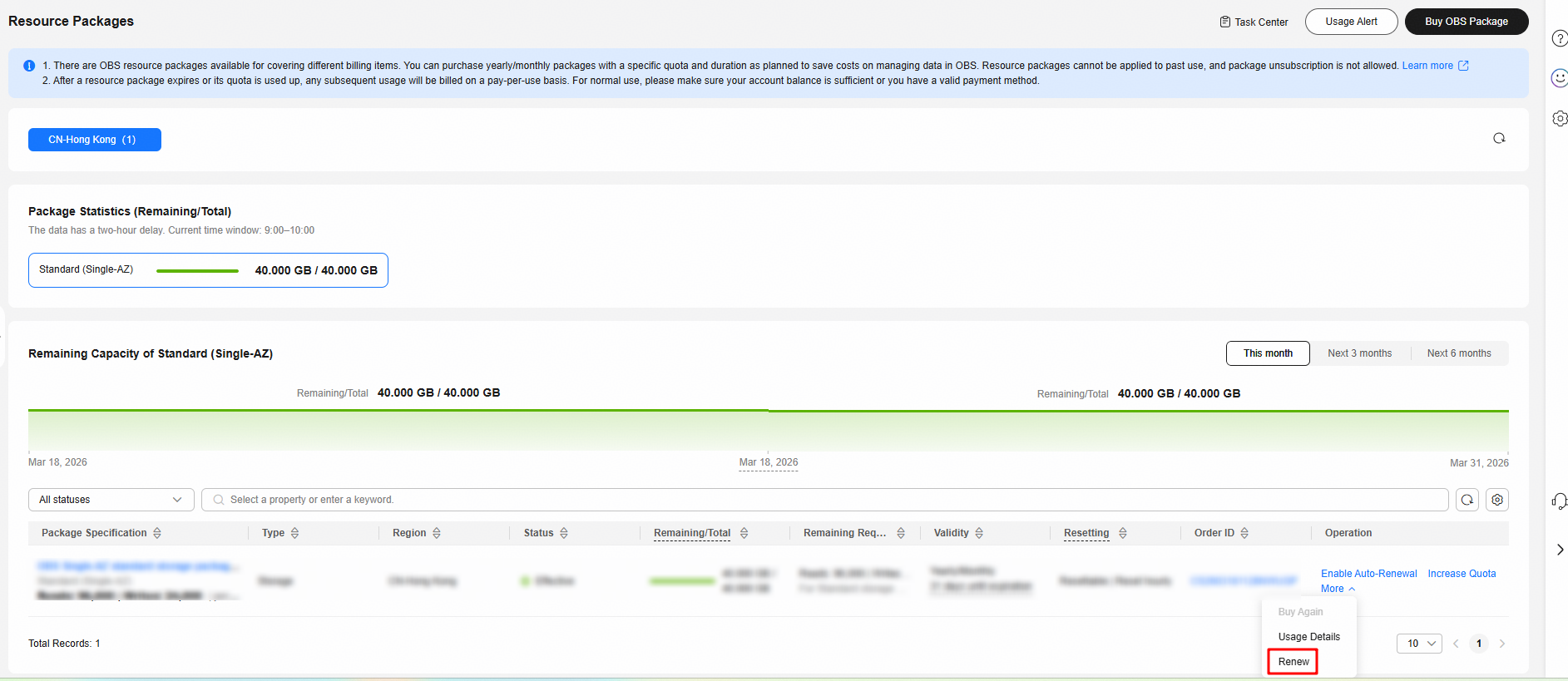
- Select a renewal duration and optionally select Renew on the standard renewal date (see Setting the Same Renewal Day for Resource Packages). Confirm the price and click Pay.
Figure 2 Confirming the renewal
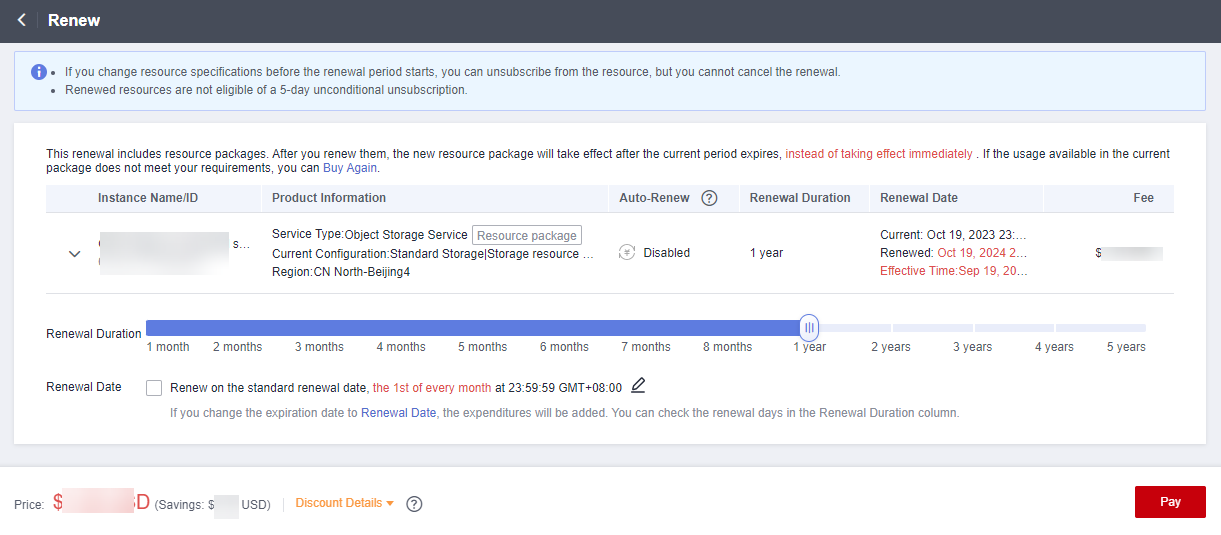
- Select a payment method and make your payment. Once the order is paid, the renewal is complete.
Manually Renewing Resource Packages in Billing Center
- Go to the Renewals page.
- Set the search criteria. You can define it by specifying the expiration time, name/order number/ID, product type, region, and enterprise project.
On the Manual Renewals, Auto Renewals, Pay-per-Use After Expiration, and Renewals Canceled pages, you can view the resources to be renewed.
Figure 3 Setting search criteria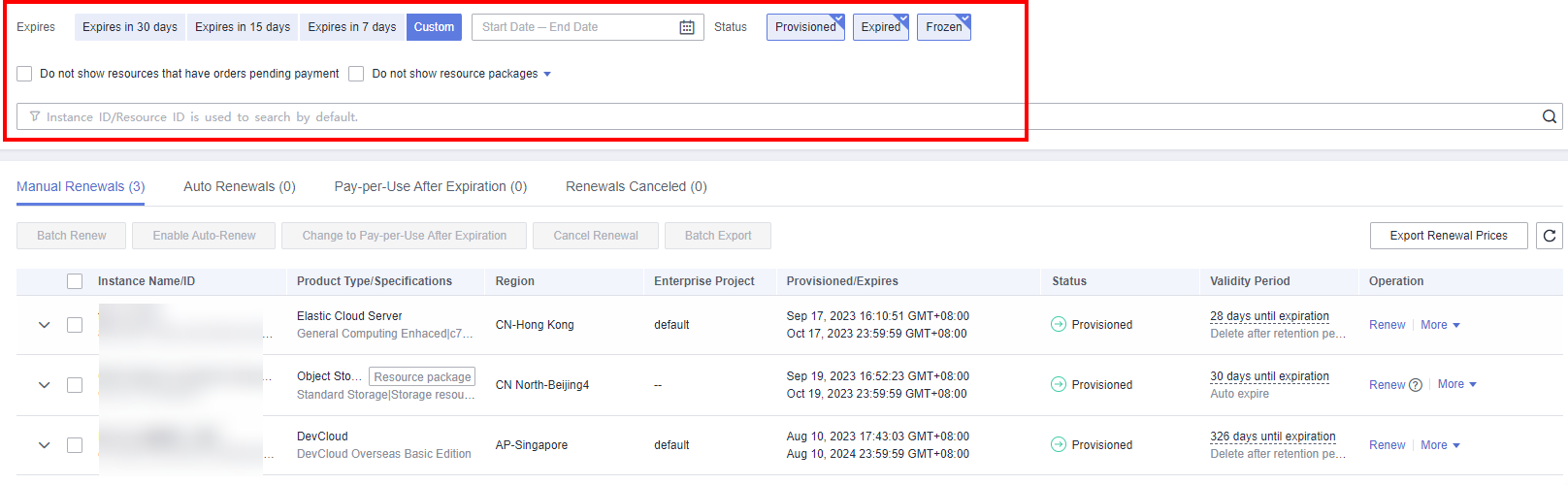
- If you have enabled enterprise project management, you can set the search criteria to select an enterprise project and query its resources that are to be renewed.
- If you select a single expiration criterion, for example, Expires in X days, the resources that will expire in X days and are in the Provisioned state will be displayed. If you select both Expires in A days and Expires in B days (A > B), the resources that will expire in A days will be displayed.
- The Do not show resources that have orders pending payment option is deselected by default. You can select it to hide resources with orders pending payment.
- You can move all resources that need to be manually renewed to the Manual Renewals tab page. For details, see Enabling Manual Renewal.
- Manually renew resource packages.
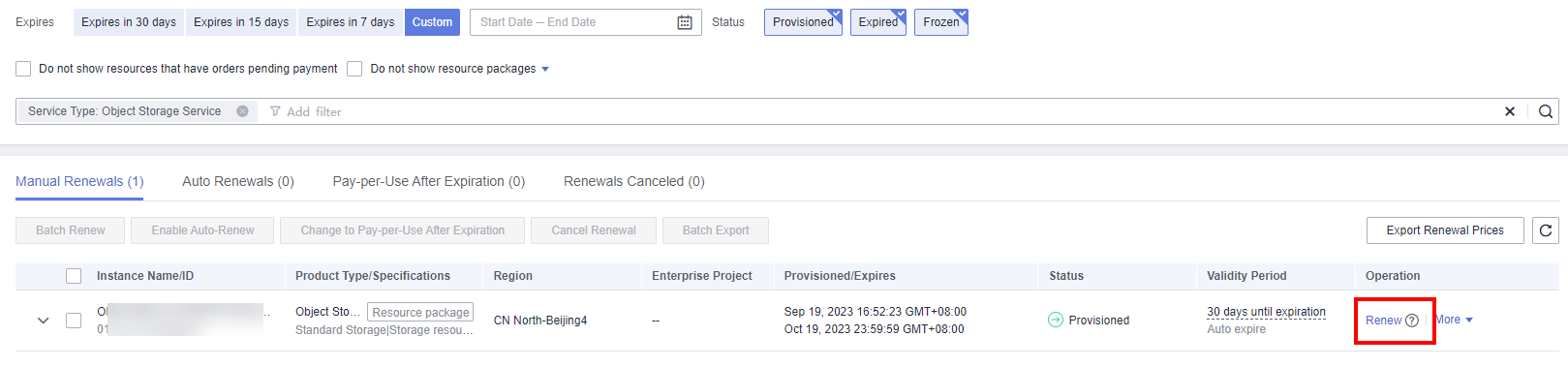
- Individual renewal: Locate the required resource package and click Renew in the Operation column.
Figure 4 Manually renewing a single resource package
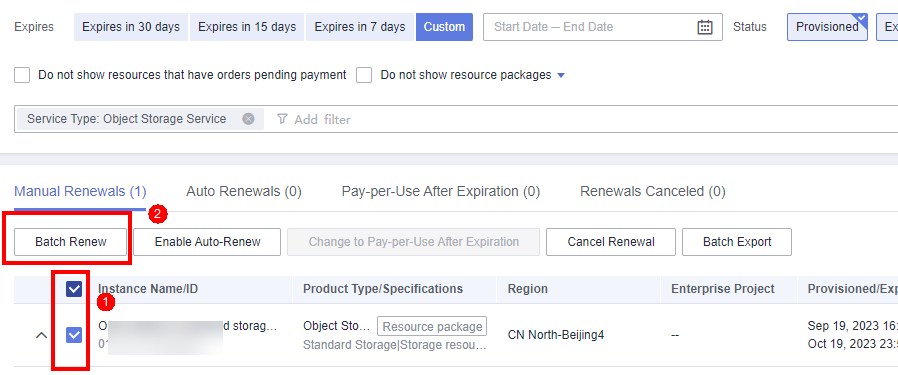
- Batch renewal: Select the required resource packages, and click Batch Renew in the upper left corner of the list.
Figure 5 Manually renewing resource packages in one batch
- Individual renewal: Locate the required resource package and click Renew in the Operation column.
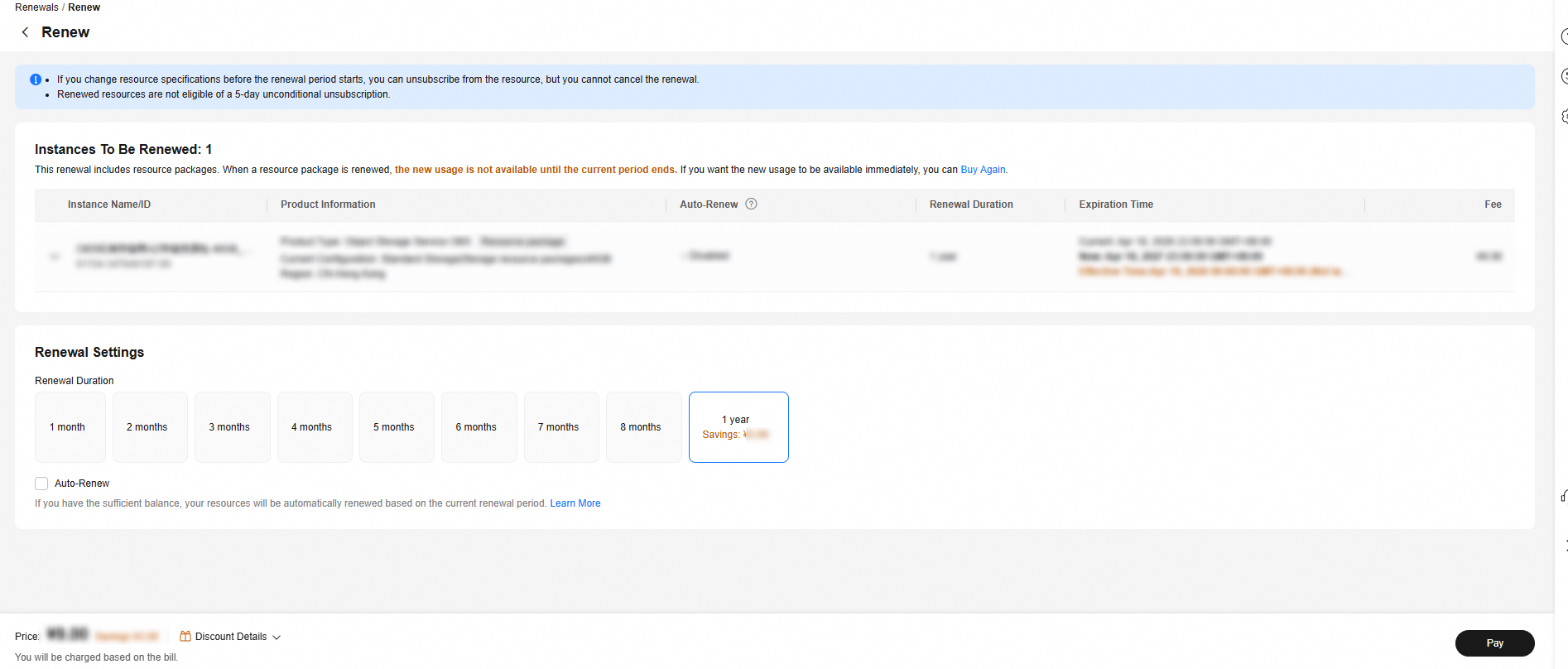
- Select a renewal duration and optionally select Renew on the standard renewal date (see Setting the Same Renewal Day for Resource Packages). Confirm the price and click Pay.
Figure 6 Confirming the renewal
- Select a payment method and make your payment. Once the order is paid, the renewal is complete.
Setting the Same Renewal Day for Resource Packages
If your resource packages have different expiry dates, you can set the same renewal day, for example, the first day of each month, to make it easier to manage renewals.
In Figure 7, a user sets the same renewal day for two resources that will expire at different dates.

For more details, see Setting a Renewal Date.
Prerequisites for Auto Renewals
- You have completed real-name authentication.
- You have purchased at least one OBS resource package. For details, see Resource Package Purchase.
- Your resource packages have not expired.
- Your account balance is sufficient.
Auto Renewal Operations
The following are operations related to auto renewals. For more information, see Auto-renewal.
Enabling Auto-Renewal
- Go to the Renewals page.
- Set the search criteria. You can define it by specifying the expiration time, name/order number/ID, product type, region, and enterprise project.
- On the Auto Renewals page, you can check the resources with auto-renewal enabled.
- You can enable auto-renewal for resources on the Manual Renewals, Pay-per-Use After Expiration, and Renewals Canceled tabs.
Figure 8 Setting search criteria
- If you have enabled enterprise project management, you can set the search criteria to select an enterprise project and query its resources that are to be renewed.
- If you select a single expiration criterion, for example, Expires in X days, the resources that will expire in X days and are in the Provisioned state will be displayed. If you select both Expires in A days and Expires in B days (A > B), the resources that will expire in A days will be displayed.
- The Do not show resources that have orders pending payment option is deselected by default. You can select it to hide resources with orders pending payment.
- Enable auto-renewal for resource packages.
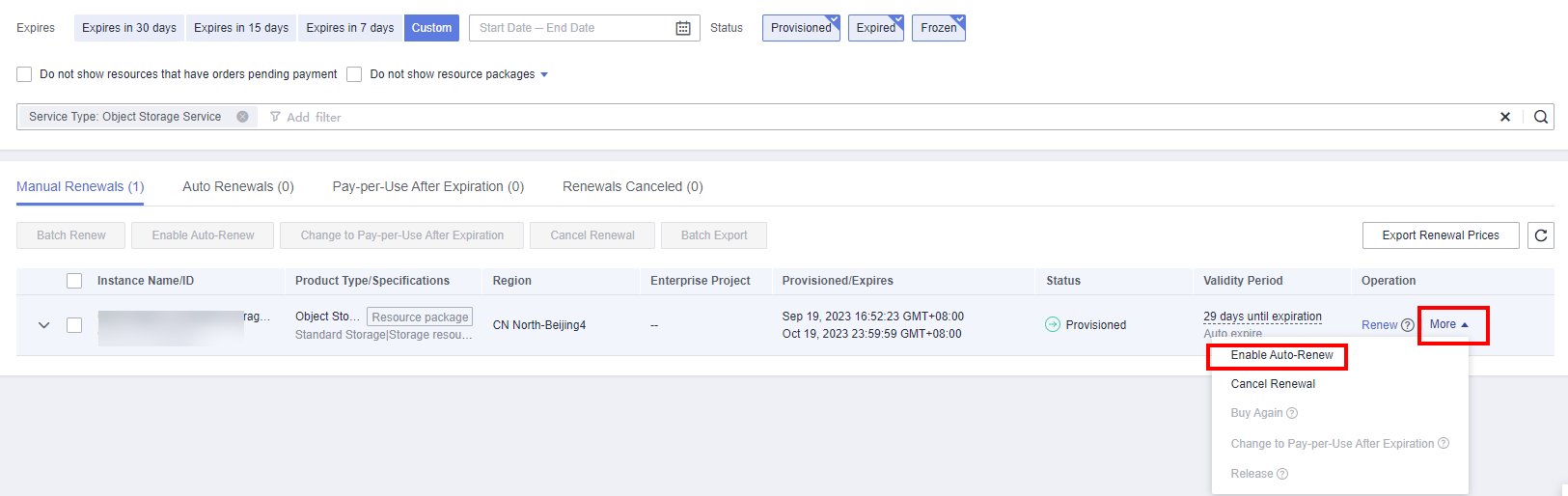
- Enabling auto-renewal for a single package: Select the package for which you want to enable auto-renewal and click Enable Auto-Renew in the Operation column.
Figure 9 Enabling auto-renewal for a single package
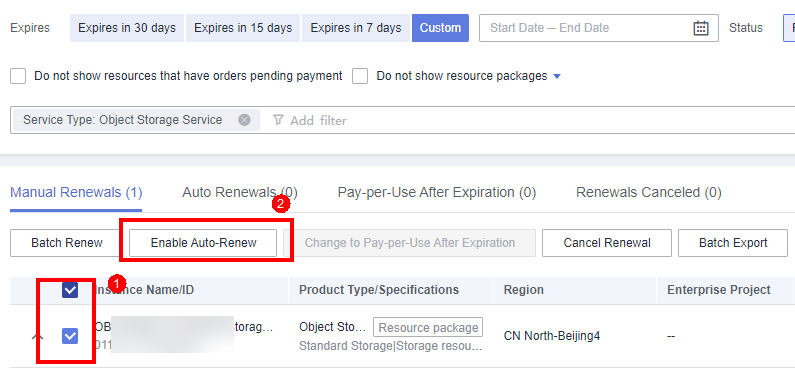
- Enabling auto-renewal for multiple packages at a time: Select the resource packages for which you want to enable auto-renewal and click Enable Auto-Renew above the list.
Figure 10 Enabling auto-renewal for multiple packages
- Enabling auto-renewal for a single package: Select the package for which you want to enable auto-renewal and click Enable Auto-Renew in the Operation column.
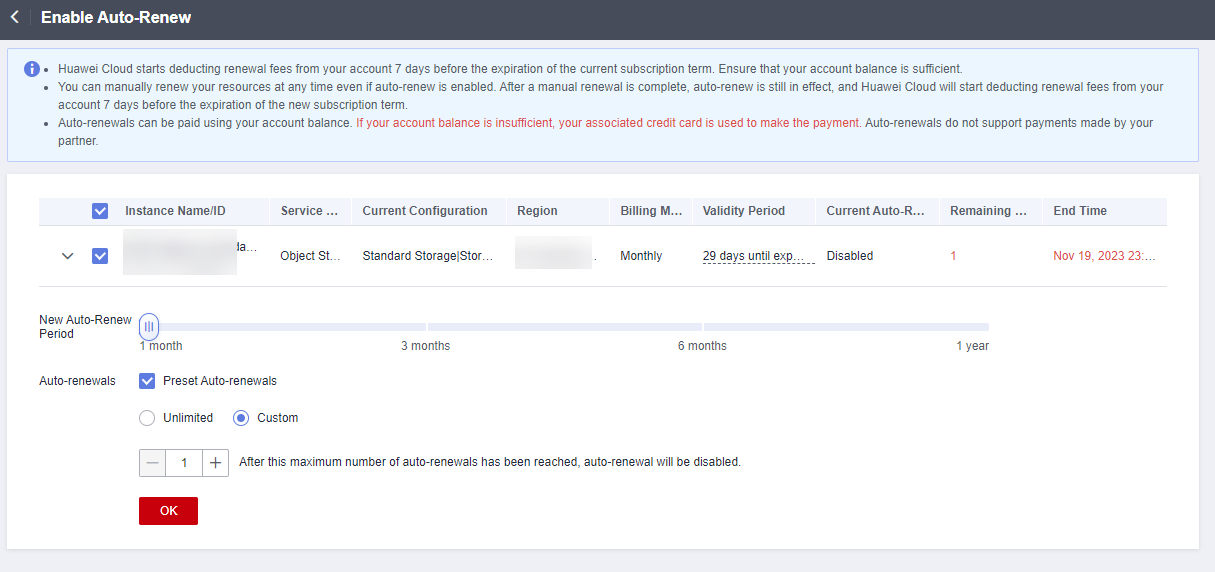
- Select a renewal period, specify the auto-renewal times, and click OK.
Figure 11 Enabling auto-renewal
Modifying Auto-Renewal Settings
- Go to the Renewals page.
- Set the search criteria. You can define it by specifying the expiration time, name/order number/ID, product type, region, and enterprise project.
Search for the resource packages whose auto-renewal settings need to be modified.
Figure 12 Setting search criteria
- If you have enabled enterprise project management, you can set the search criteria to select an enterprise project and query its resources that are to be renewed.
- If you select a single expiration criterion, for example, Expires in X days, the resources that will expire in X days and are in the Provisioned state will be displayed. If you select both Expires in A days and Expires in B days (A > B), the resources that will expire in A days will be displayed.
- The Do not show resources that have orders pending payment option is deselected by default. You can select it to hide resources with orders pending payment.
- Click the Auto-Renewals tab.
- Modify auto-renewal settings for resource packages.
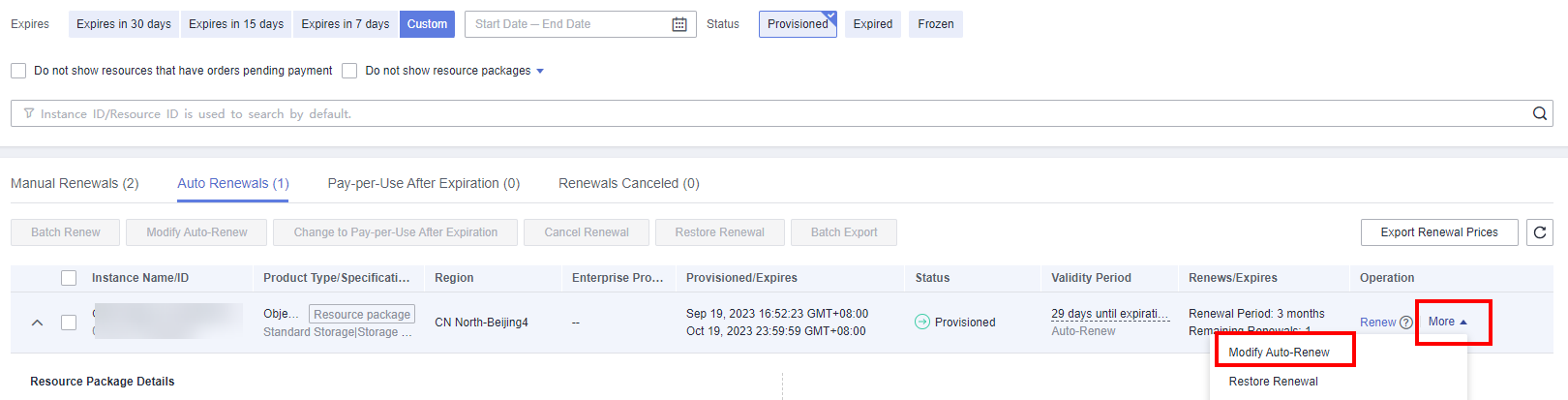
- Modifying auto-renewal settings for a single package: Locate a required package and click Modify Auto-Renew in the Operation column.
Figure 13 Modifying auto-renewal settings for a single package
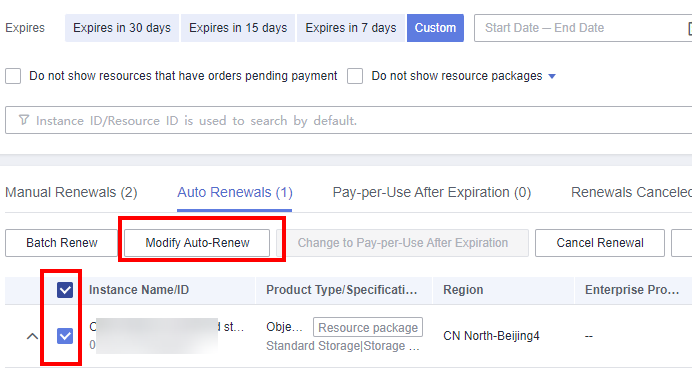
- Modifying auto-renewal settings for multiple packages in a batch: Select the required packages and click Modify Auto-Renew above the list.
Figure 14 Modifying auto-renewal settings for multiple packages in a batch
- Modifying auto-renewal settings for a single package: Locate a required package and click Modify Auto-Renew in the Operation column.
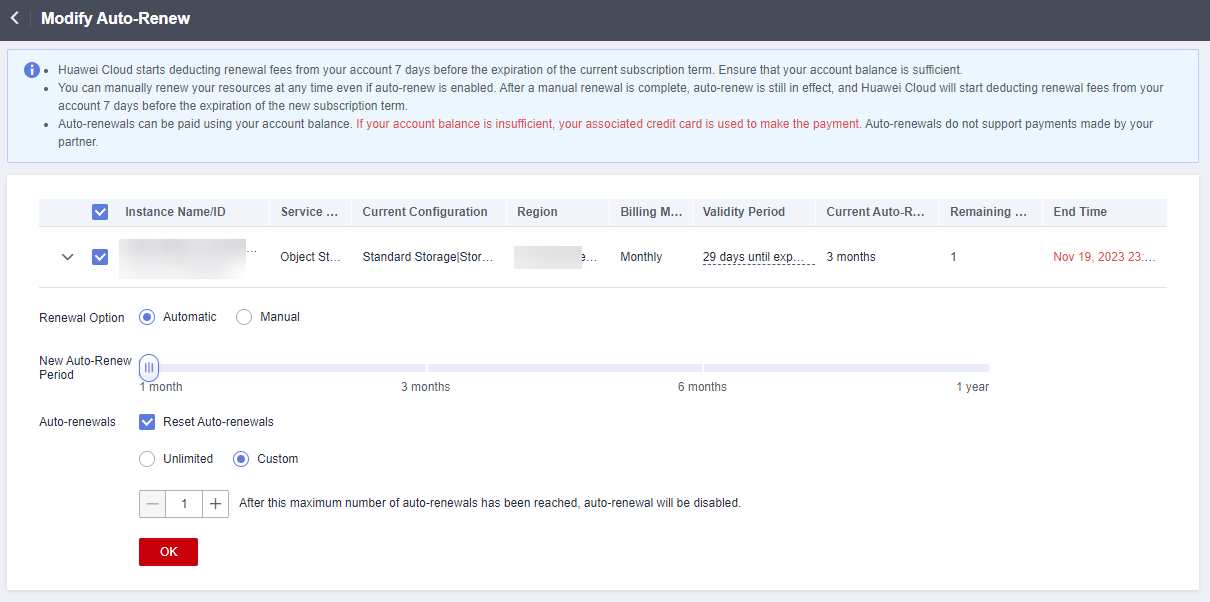
- Modify the renewal option, renewal period, and renewal times, and click OK.
Figure 15 Modifying auto-renewal settings
Related Operations
You can also perform other relevant operations:
How to View Expiration Time
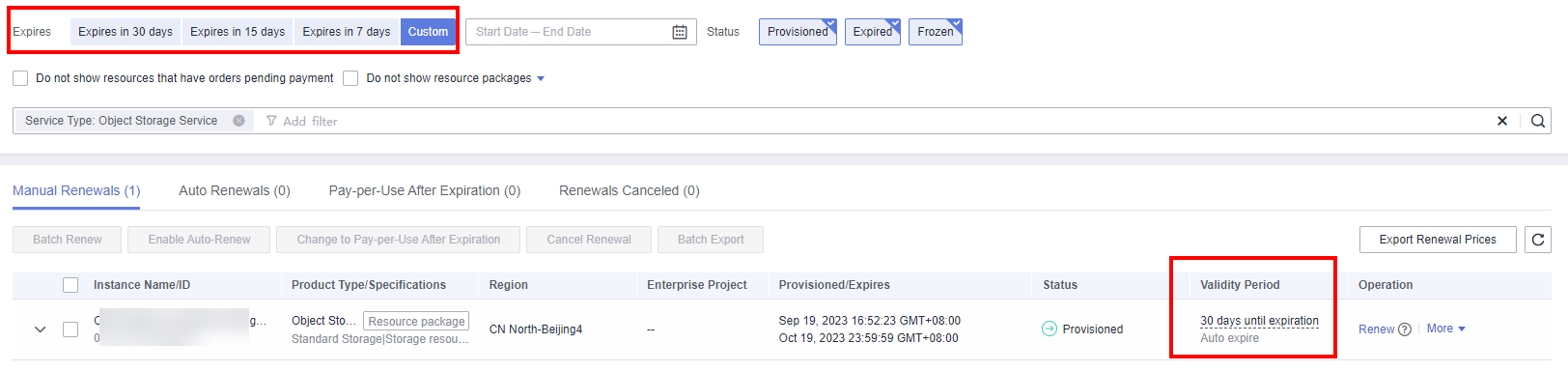
On the Renewals page, filter resources that are about to expire by expiration time and view the detailed information in the Validity Period column.
Feedback
Was this page helpful?
Provide feedbackThank you very much for your feedback. We will continue working to improve the documentation.See the reply and handling status in My Cloud VOC.
For any further questions, feel free to contact us through the chatbot.
Chatbot


